The market dashboard I open every day
Most mornings I want to know one thing: how is the market doing today. For a long time, answering that meant jumping between platforms. Stock prices on one site, crypto on another, the news somewhere else, and the economy numbers on yet another one. Every one of them shows what it thinks is important, in its own layout, and none of them lets me decide what I want to see.
So I built my own with the help of Claude Code. It's called Market Monitor and it lives at finance.devfmd.xyz. The idea is simple. It's one page that I can glance at for a minute and get a feel for how the market is behaving, and if something looks strange I can dig into it from the same place. The financial and economic numbers I care about are all there, and I have total control over what shows up and in what order. All the data comes from free public sources like Yahoo Finance, FRED, CoinGecko, Binance and the news outlets' own feeds.
It's open to everyone and you don't need an account to use it. An account only saves your layout so it follows you to other devices.
Below I go through the parts I use the most.
The watchlist
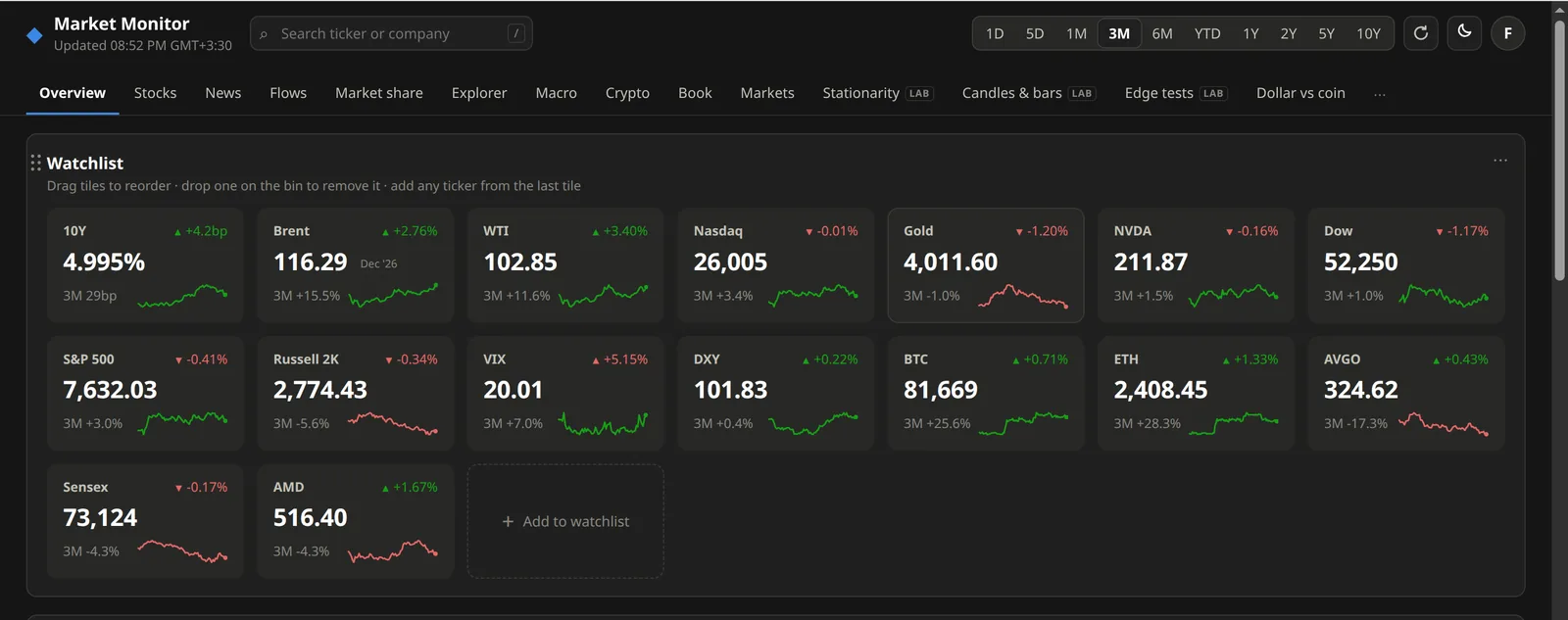
The first thing on the Overview tab is the watchlist. It's a grid of tiles for the things I follow: indexes like the S&P 500, Nasdaq and the Dow, a few stocks like NVIDIA and AMD, Bitcoin and Ethereum, and things like oil, gold, the 10-year yield and VIX. Each tile shows the price, today's change and a small chart for the time window you pick at the top, anything from one day to ten years. Together they give a quick summary of how the market behaved.
It's completely customizable. You can drag tiles to reorder them, drop one on the bin to remove it, and add any ticker from the last tile. The search box at the top (press /) finds anything Yahoo Finance lists, so you're not limited to US stocks. The rest of the page works the same way. Panels can be moved, resized or hidden, and so can whole tabs.
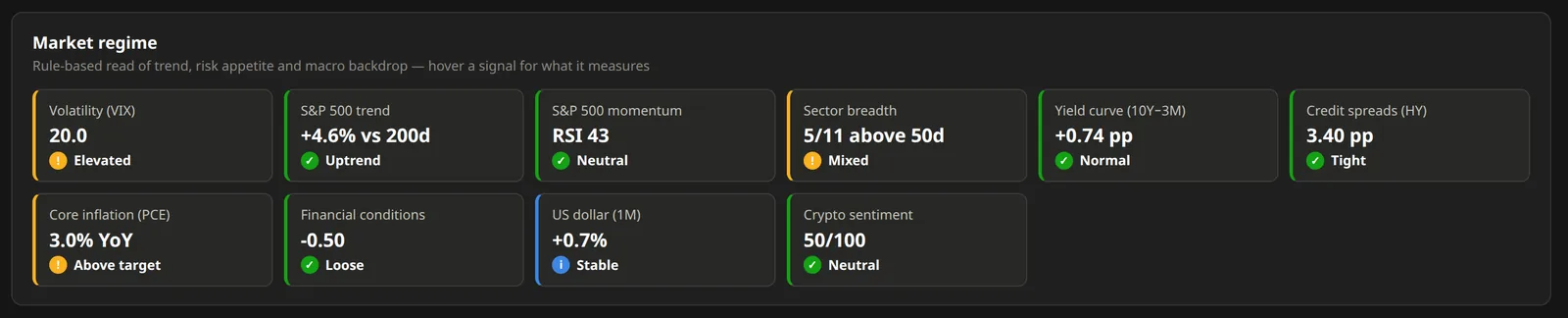
A bit further down there is a "Market regime" panel. It's ten simple rules that read the trend, risk appetite and the macro backdrop. Is VIX calm or elevated, is the S&P 500 above its 200-day average, how many of the 11 sectors are above their 50-day average, is the yield curve inverted, are credit spreads tight, and so on. None of it is clever. It just saves me from checking each of these one by one.
Top movers
Right below the watchlist, next to a relative performance chart, there is "Today's movers". It looks at everything the dashboard tracks (every index, stock, ETF, commodity and coin) and shows the six biggest winners and the six biggest losers of the day. On the day I took these screenshots, crude oil was on top and natural gas was at the bottom. Clicking a name opens it in the Explorer tab, where you get the full chart and the statistics for that one asset.
The relative performance chart is the other half of that row. Every line starts at 100, so you can put Bitcoin, Brent, the S&P 500 and gold on the same axis and see who actually did better over the period. You can add any asset to it or click a name to hide it.
News
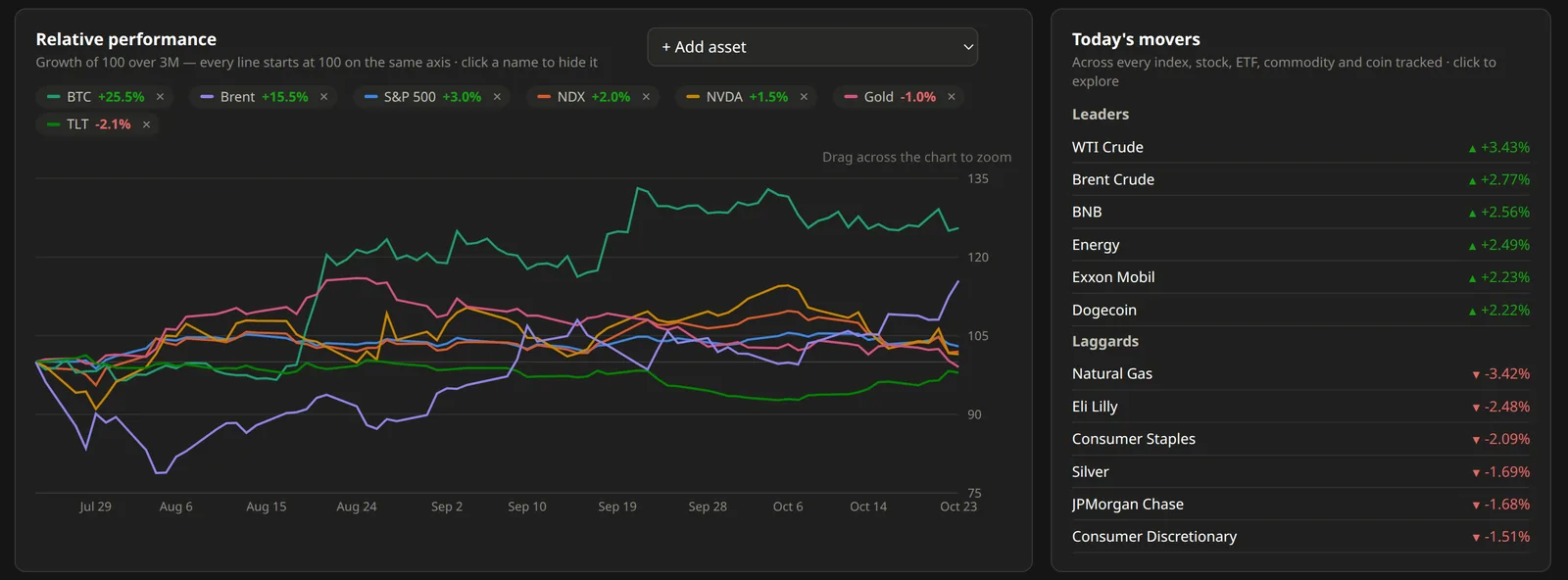
The News tab pulls headlines from CNBC, Bloomberg, the FT, MarketWatch, the New York Times, The Guardian, BBC, Investing.com and the Fed and ECB press releases, and it groups the same story across outlets. So when three papers write about oil going over $117, I see it once, with the outlets listed under it and the other headlines folded away.
Then it ranks the stories with a few rules. A story that more outlets are carrying goes up, and so does anything about things that move markets, like central banks, inflation, oil, or a big company's results. Listicles, "3 stocks to buy" columns and lifestyle pieces go down. "Important" shows the short list and "Everything" shows all of it.
On the left there are two smaller panels. "Why it moved" takes the US large caps that moved 3% or more today and puts the headlines next to them, so a red -6% on AT&T comes with its reason. "Central banks" lists the latest Fed and ECB decisions and minutes.
Where money went
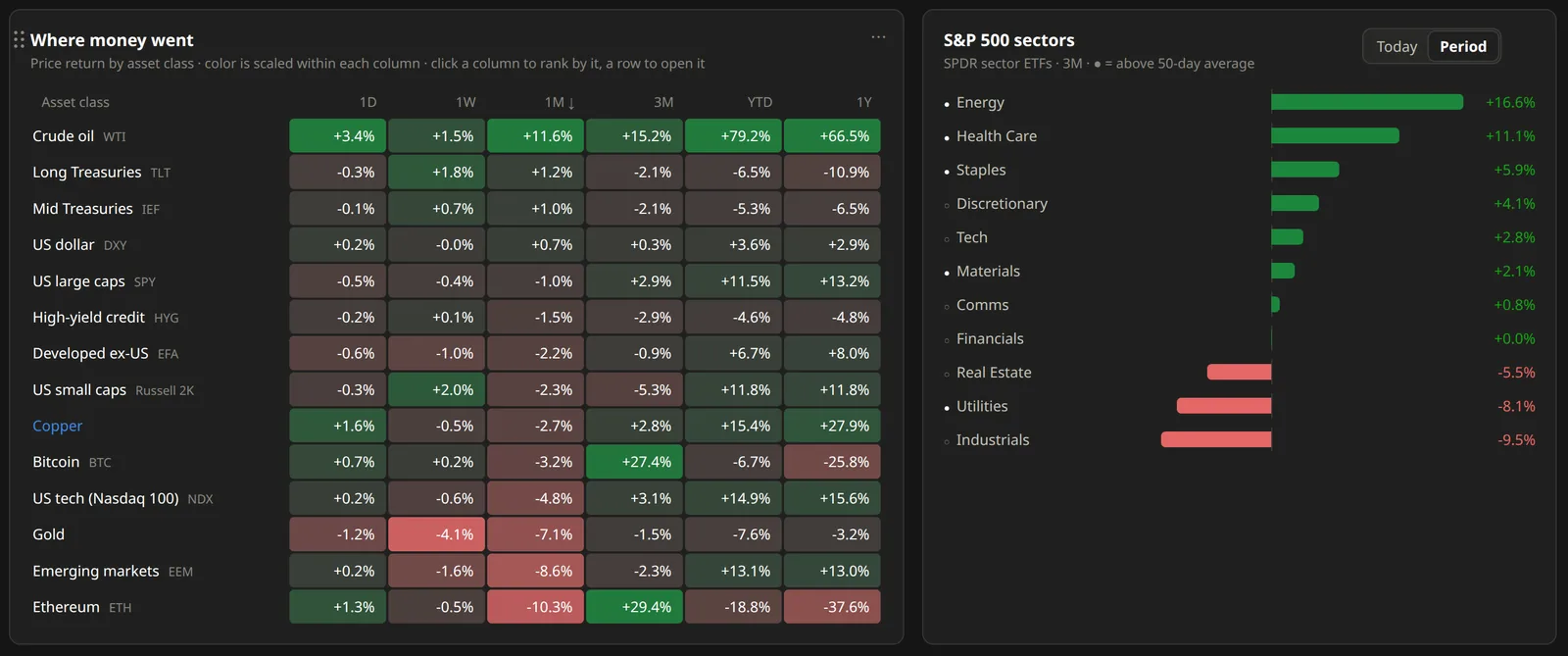
This is my favorite part. Prices tell you what went up and what went down, and this part tries to answer where the money went. There are two views for that.
The first one is on the Overview tab. It's a table of asset classes (oil, Treasuries, the dollar, large caps, small caps, high-yield credit, emerging markets, gold, Bitcoin, Ethereum and more) with their returns over 1 day, 1 week, 1 month, 3 months, year to date and 1 year, colored from red to green. You can click a column to rank by it. In one look you see things like oil being up 79% this year while Ethereum is down 37% over the last year. Next to it, the S&P 500 sectors are ranked by how they did.
The second one is the Flows tab, and it's about measured flows, not price moves. It adds up the creations and redemptions in 15 SPDR funds and the US spot crypto ETFs, plus net stablecoin issuance, and sums it up in one sentence at the top. The week I took this screenshot it said "Risk-off week: $2.2B out of stocks and crypto, $1.7B out of bonds, cash and gold." Under it, every market has a row for the last week and the last four weeks.
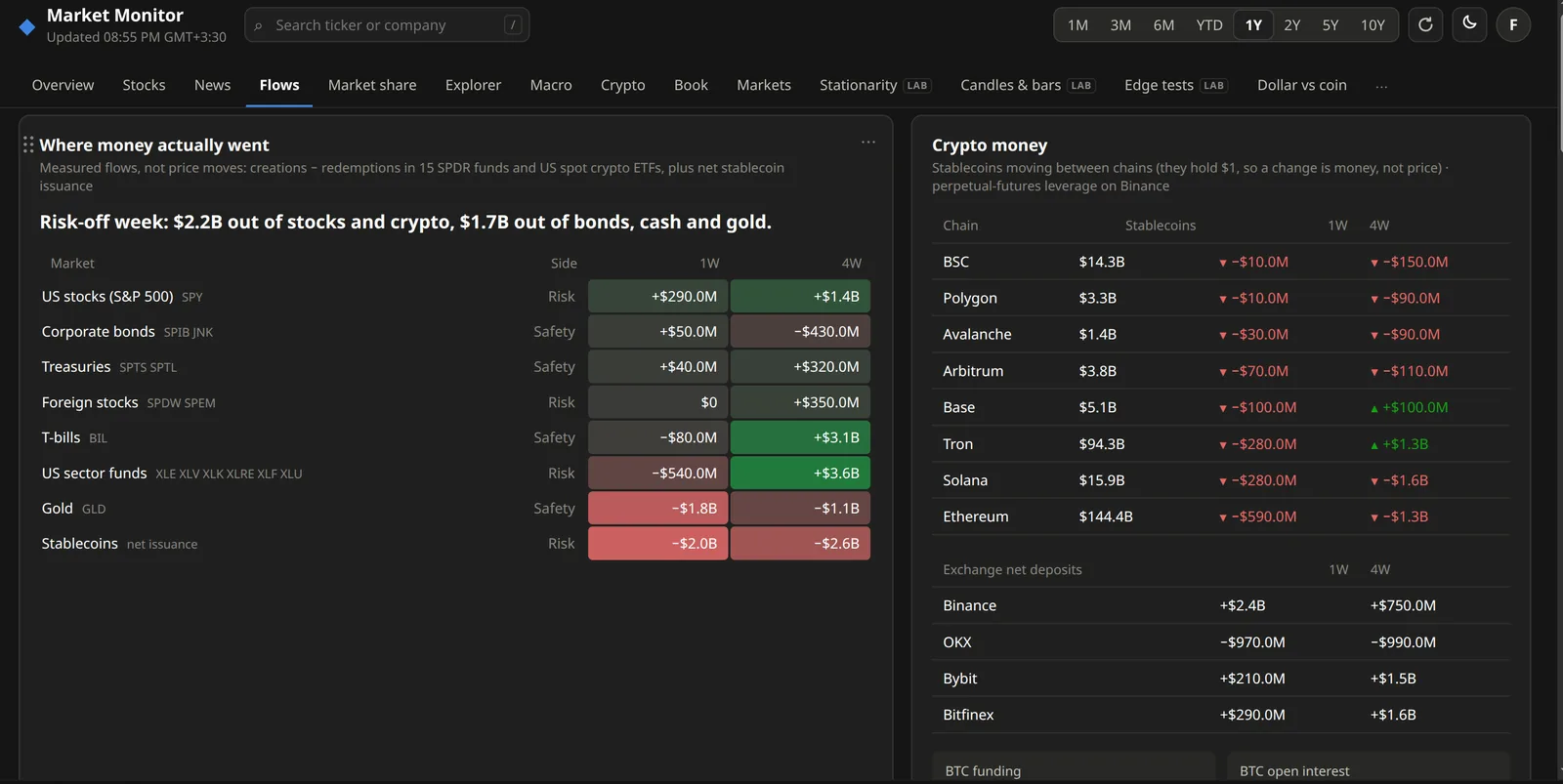
On the crypto side it shows stablecoins moving between chains. A stablecoin is always worth $1, so a change there is real money coming or going, not a price move. There are also net deposits to the big exchanges, and Bitcoin funding and open interest from Binance.
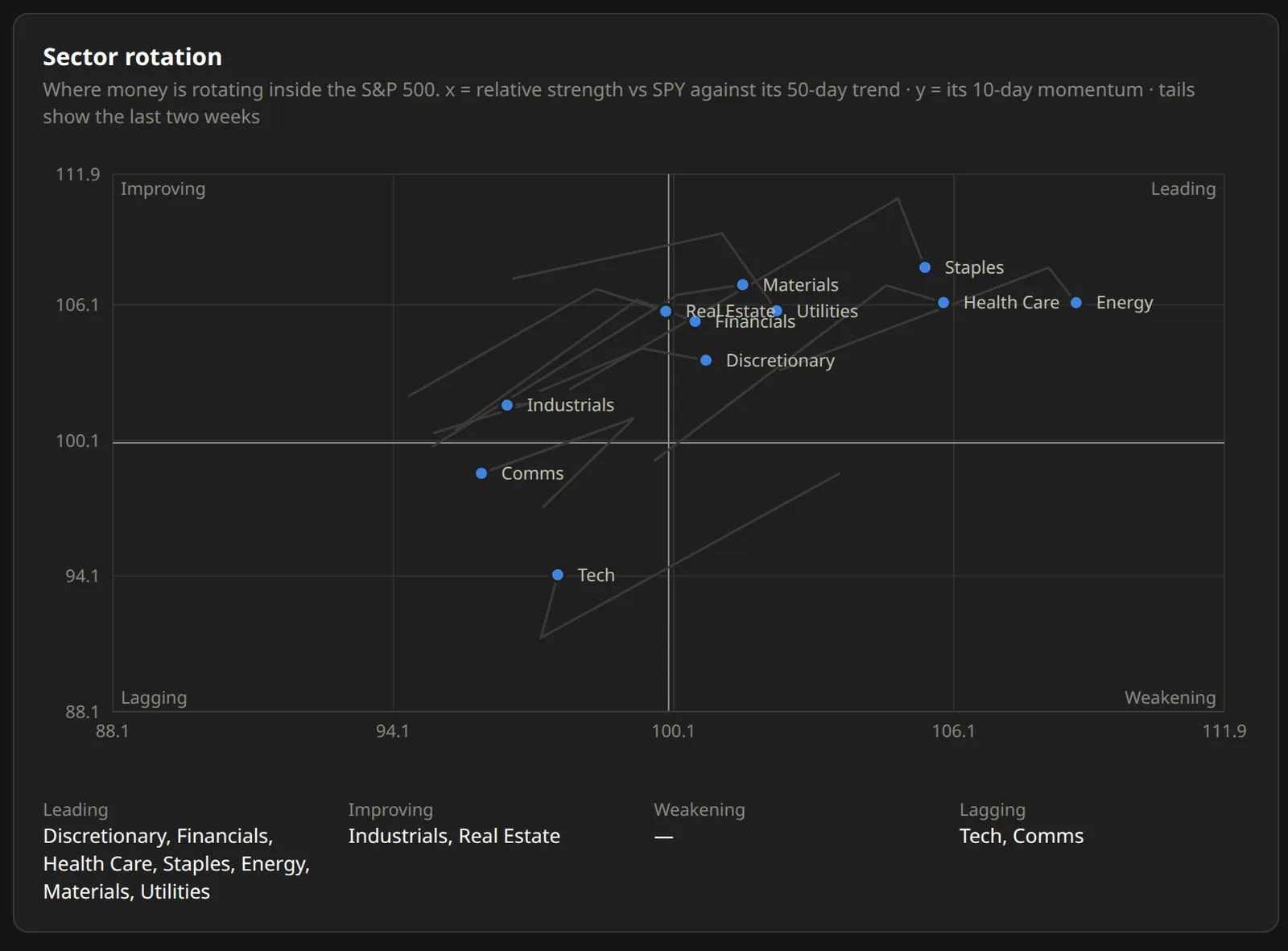
The same tab has a sector rotation map for inside the S&P 500. Each sector is a dot placed by its strength against the index and its recent momentum, with a tail for the last two weeks, so you can watch a sector move from improving to leading, or from leading to weakening.
The other tabs
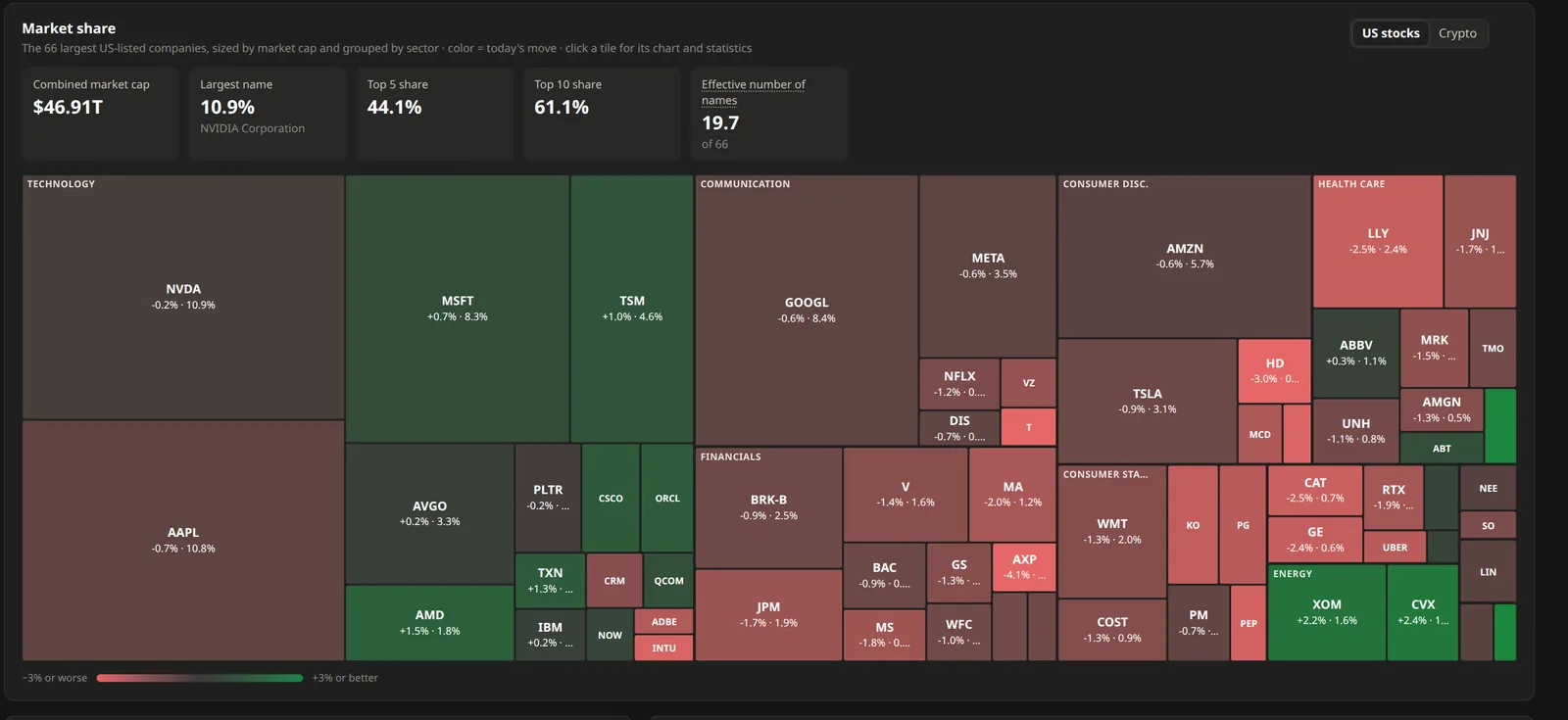
There are more tabs for when I want to go deeper. Market share is a treemap of the 66 largest US companies, sized by market cap and colored by today's move, plus a few numbers on how concentrated the market is. On that day the top 10 names were 61% of the whole group.
Macro has the US economy numbers from FRED: interest rates, inflation, jobs, GDP, the Treasury yield curve and the gap between inflation and the Fed's rate.
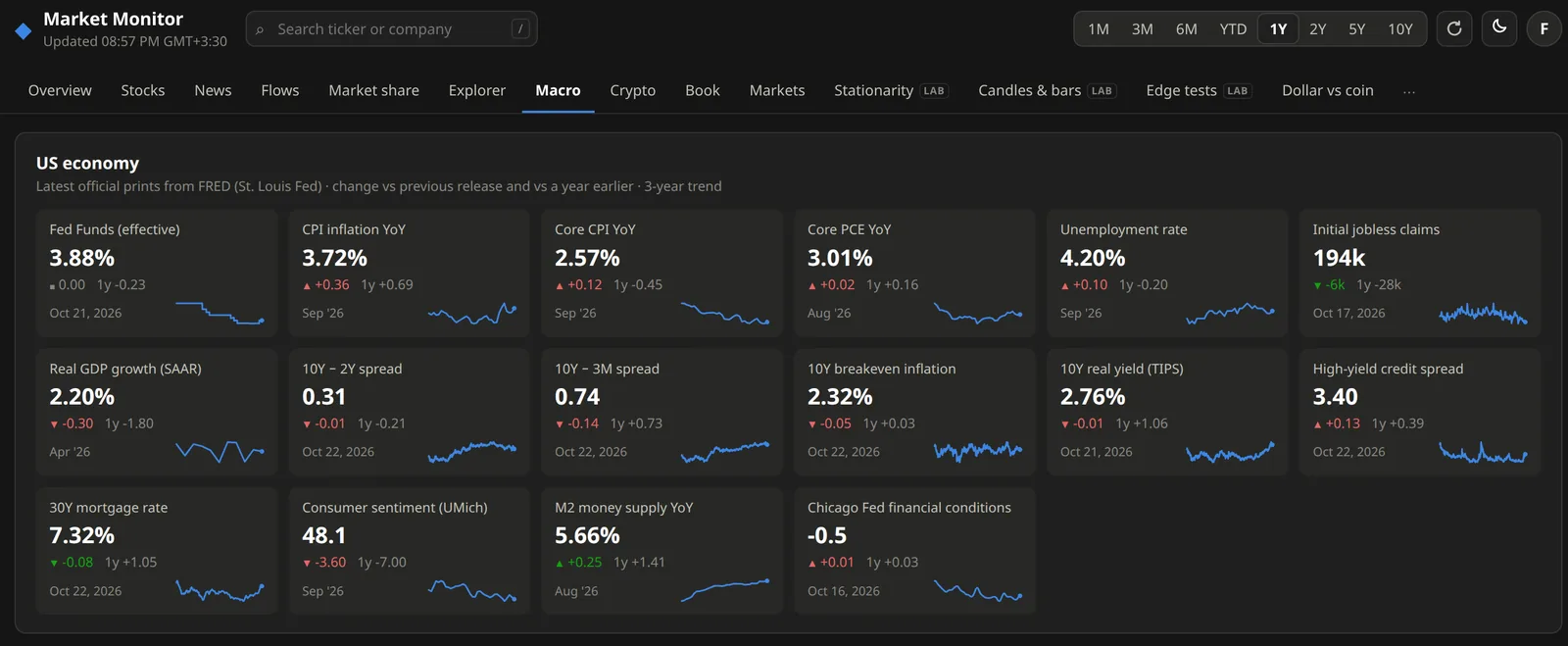
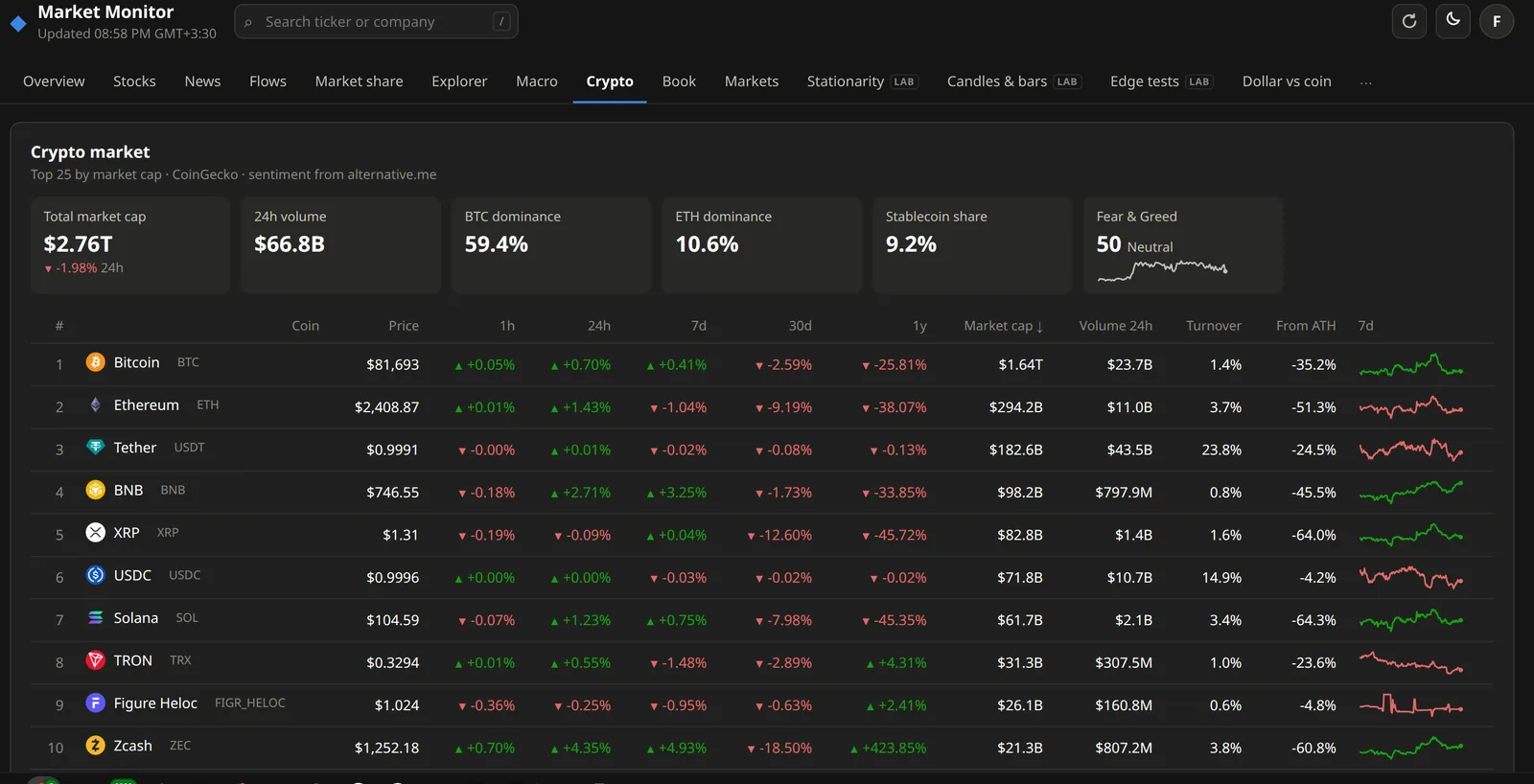
Crypto has the top 25 coins with dominance and the Fear & Greed index. Stocks is one big sortable table of the same 66 companies with valuations and their next earnings dates, and Explorer opens any single asset in depth.
My experimental tabs
The last few tabs are for my own experiments, and for now only my account can see them. The ones marked LAB are about quantitative trading statistics. They check whether a price series is stationary, which kind of bars (time, volume or dollar bars) behave closest to random, and whether a pattern in the data is a real edge or just noise. They come from an older research project of mine where I was looking for market inefficiencies.
The Book tab shows my personal automatic trading algorithm. It's a trend-following momentum strategy that trades perpetual futures on Hyperliquid, and the tab shows how it's doing live against its backtest, the current positions and the signals behind them.
Right now this only works for my own bot. What I want to add next is a way for everyone to connect their own algorithmic trading results to the dashboard, so if you run a strategy you can follow it next to the rest of the market, in the same place.
If you want to try it, it's at finance.devfmd.xyz. Everything except the experimental tabs is open, no account needed. If you make one, your layout is saved and follows you to your other devices. And if you think something is missing, tell me.