Streaming Text Generation with SSE in Golang: Building an LLM Interface
Updated 2026-10-23: fixed the timing numbers and the Connection header part, and added a note about Echo v5 and how LLM apps stream now (at the end).
I was wondering what makes it possible for language model (LLM) interfaces to load words gradually. Initially, I thought about using WebSockets, but then I realized that many implementations rely on HTTP streaming and Server-Sent Events (SSE). This led me to dive deeper into SSE and its implementation, which is particularly well-suited for this purpose. In this post, I'll guide you through understanding SSE and building a simple example using the Golang Echo framework. We'll also model word generation intervals and create a complete implementation hosted on GitHub.
Introduction to SSE
Server-Sent Events (SSE) is a server push technology enabling a server to push real-time updates to a web client over a single HTTP connection. Unlike WebSockets, SSE uses a one-way connection from the server to the client, which is ideal for scenarios where the client only needs to receive updates from the server.
Here’s a basic example to illustrate how SSE works using the Golang Echo framework. First, let's set up our server:
Simple Example with Golang Echo Framework
<script src="https://gist.github.com/farid-moradi/64114ce6d8fa78ef4977f0431dff0084.js"></script>This code sets up a simple SSE endpoint that sends a message to the client every second. You can see the updates in real-time in the browser’s network inspector.
For SSE, specific HTTP headers need to be set in the server's response to properly communicate with the client. Here are the key headers that should be included:
- Content-Type: This header must be set to
text/event-streamto indicate that the response is an SSE stream. - Cache-Control: This header should typically be set to
no-cacheto prevent the response from being cached by proxies or the browser. - Connection: This header should be set to
keep-aliveto ensure the connection remains open for as long as possible. This only means something on HTTP/1.1, where keep-alive is the default anyway. HTTP/2 doesn't allow this header and Go's server just drops it, so you can leave it out.
In SSE, the server sends a specially formatted stream of text to the client. Each message in this stream is preceded by "data: " followed by the actual data content of the message. Here's how it works:
- "data: ": This prefix indicates that the following text is the payload of the SSE message. It's a key part of the SSE protocol that ensures the client can properly parse and handle the incoming data.
- "\n\n": Each message is terminated by a double newline. This indicates the end of a single message. The client waits for this delimiter before processing the message. If your payload has a newline in it, every line needs its own
data:prefix, otherwise the client just drops the lines after the first one.
In the example, the line fmt.Fprintf(c.Response(), "data: %s\n\n", wordList[i]) sends a string formatted as "data: %s\n\n" where the payload is a word in wordList. The c.Response().Flush() call ensures that the message is immediately sent to the client without buffering.
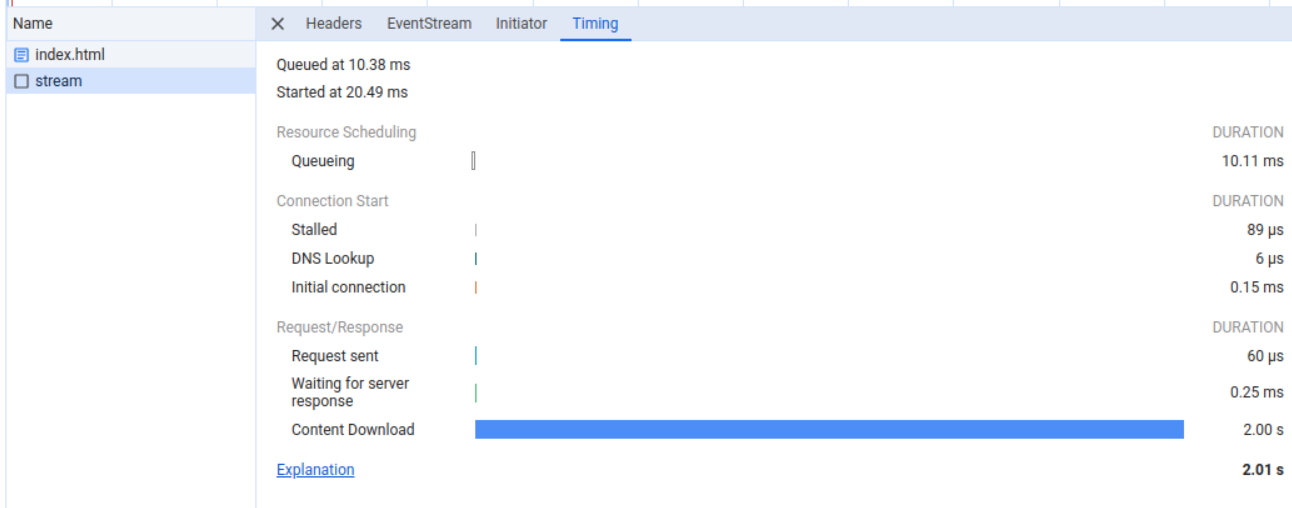
To visualize how SSE messages are received by the client, you can open your browser’s developer tools and inspect the Network tab. You’ll see individual SSE messages being streamed in real-time. Here you can see that the entire response takes 2 s. The first word arrives right away, the second one after 1 s, and then the server sleeps one more second before it closes the connection:
Here you can see the messages in the EventStream tab in the network inspect in the browser:

Mimicking Word Generation
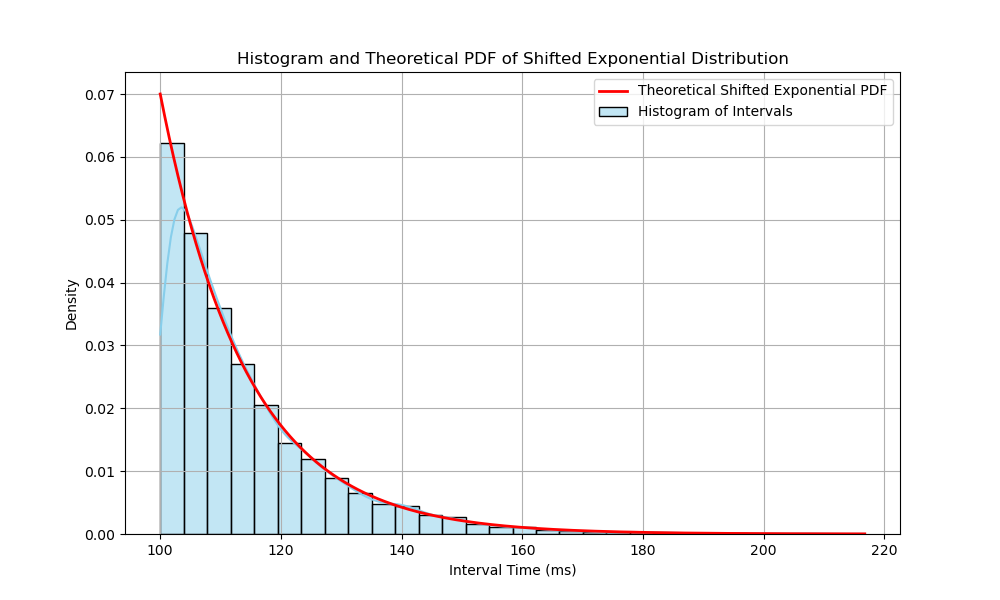
To mimic the process of word generation, we can model the time interval between generating the next word in milliseconds as a random variable that follows an exponential distribution with a rate parameter of 0.07, and a location shift of 100 milliseconds as the minimum. This creates a realistic simulation of the gradual word generation seen in LLM interfaces. A rate parameter of 0.07 means the mean of the distribution is approximately 14.29 milliseconds, so the expected interval is 100 ms + 14.29 ms ≈ 114 ms. That is around 9 words per second, which is slower than most models stream today, but it looks fine for a demo.
Here's the Python code to plot the exponential distribution of the random variable we are examining:
<script src="https://gist.github.com/farid-moradi/b51c827fe99be6935b779150c38277c4.js"></script>This generates the following plot:
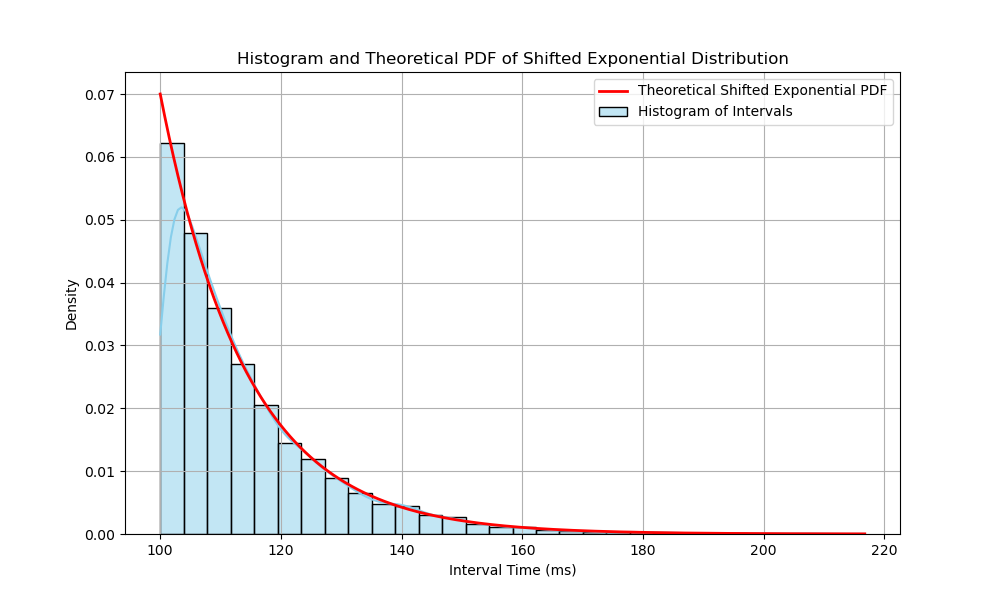
You can see the random values generated from this distribution start at 100 ms, and as we move further to the right, the probability of taking longer for the next word to be generated decreases. This is similar to what we see in LLM interfaces where most words appear quickly, but occasionally it takes longer for the next word to load. Our assumption about the random variable following the exponential distribution is simplistic, since it treats every interval as independent of the ones before it, but it serves our needs in this example.
Final Implementation and GitHub Hosting
To see the complete implementation and run it yourself, you can find the project hosted on GitHub: GitHub Repository
Below is a snippet that streams a string:
<script src="https://gist.github.com/farid-moradi/64de111992d05a37696e6f6c771644e2.js"></script>We defined a new function named ExpRand to generate random numbers based on the exponential distribution we talked about. In the main function, we create a new Echo instance and add a CORS middleware. Then we define a GET route /stream that sets the SSE headers and uses the strings.Fields function to split the text string into slices of substrings. Then we send the string word by word to the client. Finally, we start the Echo server to listen on port 8080.
Update 2026-10-23
Two things changed since I wrote this.
Echo v5 came out in January 2026. In v5 the handler gets *echo.Context instead of echo.Context, and c.Response() returns a plain http.ResponseWriter, so c.Response().Flush() doesn't compile anymore. You can use http.NewResponseController(c.Response()).Flush() instead, and with v5.4.1 the words still come one by one. The simple example is on v4, which still gets releases, so it works as it is. The final snippet imports github.com/labstack/echo though, which is the old v3 path. It should be github.com/labstack/echo/v4 like the simple example.
The second one is about how LLM interfaces stream. The APIs (OpenAI, Anthropic, Gemini) still use SSE, but the request is a POST with a JSON body (the prompt, the model and so on) and an API key in a header. The browser EventSource that I used in the index.html files in the repo can only send GET requests and you can't set headers on it. So chat UIs usually call fetch(), read response.body as a stream and parse the data: lines themselves, and each data: line is a JSON chunk, not a plain word like in my example. The server side is the same idea as this post, only the client is different.
In conclusion, by using SSE and modeling word generation with an exponential distribution, we can effectively create a smooth and realistic text streaming experience. Feel free to explore and modify the code to suit your needs!